Every directory website faces the same chicken-and-egg problem: businesses won't claim a listing on a site nobody visits, and nobody visits a directory with three listings in it. The traditional fix — copy-pasting business details from Google Maps one tab at a time, or wrestling with a Google Maps scraper and a pile of messy CSV files — is exactly why most directory projects die in week one.
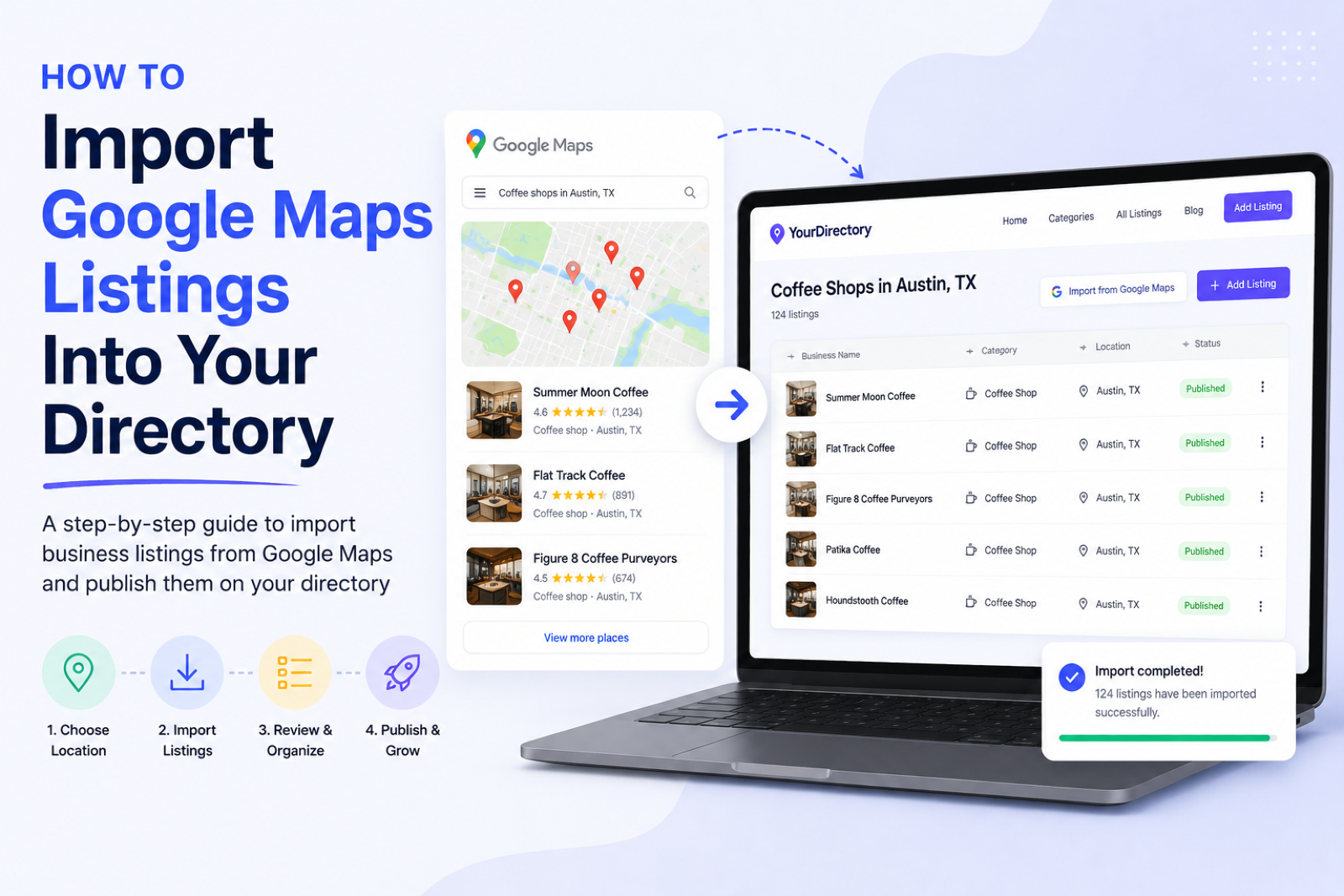
That problem is now solved. With Google Maps Import, you can import Google Maps listings into your directory in minutes: search for a niche and a location, preview real businesses, and turn the ones you want into complete, ready-to-publish listings — names, addresses, phone numbers, websites, opening hours, photos and Google reviews included.
This guide covers how the import works, what data you get with every listing, what it costs, and how to turn a freshly imported directory into one that businesses actually claim and pay for.
The cold-start problem every directory builder knows
A business directory only becomes useful at critical mass. Visitors expect to search "plumbers in Austin" and see twenty results, not two. SEO works the same way: every listing is an indexable page, every category is a landing page, and a directory with 300 listings simply has more surface area in Google than one with 15.
Until now, filling a new directory meant one of three things:
- Manual data entry — hours of copy-pasting names, phone numbers and addresses from Google Maps into your admin panel. Accurate, but brutally slow.
- A Google Maps scraper — browser extensions and scraping scripts that break every time Google changes its markup, return stale or half-complete data, and leave you with a CSV that still needs cleaning, formatting and importing.
- Buying business data — lead-list vendors sell bulk business databases, but you pay for thousands of records you don't need, in a format that doesn't match your directory fields.
Google Maps import replaces all three with a search box inside your directory admin panel.
What is Google Maps Import?
Google Maps Import is a built-in Directify feature that populates your directory with real businesses from Google Maps. You type a plain-language search — the same thing you'd type into Google Maps itself — and get a live preview of matching businesses:
- "coffee shops in Portland, OR"
- "wedding venues in Austin, Texas"
- "zahnärzte in Berlin" — searches work in any language, for any country
From the preview you select the businesses you want (there's a Select all button and Load more results for working through a niche quickly), pick a category, choose whether listings go live immediately or as drafts, and click Import. The import runs in the background and you get a notification when your listings are ready.
There is no scraping involved and nothing to install. Listings imported with credits come from licensed business-data providers, and power users can connect their own Google API access key to use Google's official Places API directly.
What data gets imported with every listing
Each imported business arrives as a complete directory listing, not a bare name-and-address row:
- Full contact details — business name, street address, city, phone number and website. Tracking junk like
utm_parameters is stripped from website URLs automatically. - Map coordinates — latitude and longitude, so imported businesses appear on your directory's map view immediately.
- Opening hours — stored in your directory's hours field when it has one (the local business directory template ships with it out of the box).
- Photos and logo — the business's main Google photo and its logo, downloaded into your directory's own storage rather than hotlinked.
- Google reviews — the 10 newest reviews per listing, each displayed with the reviewer's name, rating and a link to their Google profile. An All reviews option imports a business's entire review history — something even Google's own API doesn't offer.
Every listing also remembers its Google place ID, which makes imports duplicate-proof: businesses you've already imported are marked in future search results and are never imported twice, even if you re-run the same search next month to pick up new openings.
How to import Google Maps listings into your directory, step by step
- Open Content → Google Maps Import in your Directify admin panel.
- Search for a niche plus a location — for example "personal trainers in Manchester" or "restaurantes en Ciudad de México".
- Preview and select. Each result shows the business details before you spend anything — searching and previewing is always free. Use Select all to grab the whole page of results.
- Choose your import options — the category for the new listings, published or draft status, and whether to include photos and Google reviews.
- Click Import. The job runs in the background; you'll get a notification when the listings are live in your directory.
From an empty directory to a hundred real, complete business listings is genuinely an afternoon's work — most of which is choosing which businesses deserve to be in your directory. That editorial layer is your advantage over the big aggregators: you're not republishing Google Maps, you're curating it.
Let AI write the descriptions and SEO
Imported data gives you the facts — but a great directory listing also needs a description that reads like a human wrote it, and SEO metadata that ranks. Optional AI enrichment takes care of both during the import: it writes a unique description, listing content and SEO title and meta description for every imported business, so you don't launch a directory full of empty description fields or duplicate boilerplate.
Enrichment runs on your own connected AI provider (OpenAI or Claude) if you've added one — at no extra cost — or through Directify's platform AI for a small credit surcharge.
What Google Maps Import costs
The economics are designed so you can start without any setup and only pay for what you actually import:
- Searching and previewing is always free. You only spend credits on the businesses you choose to import.
- Import credits start at $9 for 100 listings. Credit packs are a one-time purchase — no subscription add-on, and credits never expire. They're shared across all directories on your account, so you can seed a new project any time.
- Pro plans and above get 10 free credits to try the feature on their own niche before buying anything.
- One credit = one imported business, including its details, photos, logo and 10 newest Google reviews.
Prefer unlimited imports? Connect your own Google API key under the advanced options and import as much as you want through Google's official Places API, with usage billed by Google directly — no credits needed.
Google Maps Import is available on all paid plans.
From imported listings to paying customers
Filling the directory is step one of the classic local-directory playbook. Steps two and three are where the revenue comes from:
- Import the businesses in your niche so your directory is genuinely useful — and starts ranking for "best [niche] in [city]" searches — from day one.
- Invite businesses to claim their listing. A claimed listing means an owner who keeps their details current and has a reason to link to your site. Directify's claim-listing flow handles verification for you.
- monetization features the audience — featured placements, paid listing tiers, pay-per-lead or ad banners. We've covered the full menu in how to monetize your directory.
Directories that launch full get traffic, and traffic is what turns a claim invitation from a cold email into an easy yes. If you're starting from zero, our guide on how to start a local business directory walks through picking a niche and city where this playbook works best.
Yes. Google Maps Import doesn't scrape Google's website. Credit-based imports use licensed business-data providers, and the bring-your-own-key option uses Google's official Places API under your own Google Cloud account. You get clean, current data without violating anyone's terms of service.
No. With import credits there's zero setup — no API keys, no Google Cloud account, no configuration. Buy a credit pack, search, and import. Connecting your own Google API key is an optional advanced mode for unlimited imports.
Yes. Every credit-based import includes the business's 10 newest Google reviews, shown with the reviewer's name and a link to their Google profile. The All reviews option imports a business's complete review history.
Nothing — imports are duplicate-proof. Every listing stores its Google place ID, so already-imported businesses are flagged in search results and skipped automatically. You can safely re-run a search later to import only the new businesses in your niche.
No. Credits are a one-time purchase, never expire, and work across every directory on your account. Packs start at $9 for 100 listings, and Pro plans and above include 10 free credits.
Ready to skip the empty-directory phase? Create your directory, open Content → Google Maps Import, and launch with real businesses this afternoon.
Ready to Build Your Directory?
Start creating your professional directory website today with Directify's no-code platform.
Get Started Free